4 minute read · Practical field guide
Let the customer ask an ordinary question
A customer checking a collection time may not need another dashboard. A short text conversation can let them ask the question where they already communicate. SMS is worth considering when a plain-text exchange is enough for the job.
For a B2B supplier, the first task might be explaining collection hours or helping an established customer request a callback. Keep the scope narrow enough that the business can provide reliable information and recognize when a person should take over.
Keep the visible experience simple
The customer should know which business is answering, whether they are interacting with an automated assistant and how to reach a person. They should not need to understand the software behind the conversation to ask for help.
A draft introduction might read: “You’re texting the North Dock assistant. I can help with collection hours and callback requests. Ask for our team whenever you need a person.” Use wording that matches the actual service and staffed hours. Avoid presenting an automated response as a named employee’s personal reply.
Choose richer messaging for a specific reason
iMessage can add features such as rich media in a supported conversation. That may be useful when the task involves an approved image or document. A plain scheduling question may be just as clear in SMS. The application’s provider must support the features you intend to offer.
Make the essential answer understandable without a typing indicator, reaction or read receipt. If the channel changes, the customer should still know what happened and what to do next. Explain any feature limitation directly instead of leaving them to diagnose it.
Make the first success small and observable
Give the assistant current business information and a limited set of permitted actions. A collection-hours answer and a request to change an order are different jobs; decide which the assistant may complete and which it must pass to staff.
Try ordinary questions with consenting participants, including a question the assistant cannot answer. Watch whether people understand its scope and whether the team receives escalations with enough context. Useful early measures include completed tasks and unresolved requests. An easy customer experience comes from a well-defined service behind the text, not from adding more automated messages.
Separate the conversation from permission to act
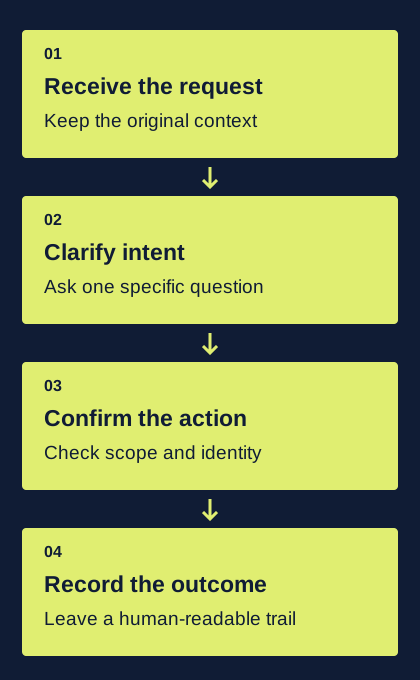
A text can express an intention without granting enough authority to execute it. “Move it to Friday” may refer to one of several appointments. “Use the new address” may require an account-verification process. The assistant should identify the requested action, the target record and the missing information before changing anything. Familiar chat language does not remove those requirements.
Use the smallest useful response when context is incomplete. In a fictional scheduling thread, “Do you mean the equipment pickup or the installation visit?” is better than silently choosing the most recent booking. A clarification is a successful outcome when it prevents an incorrect action. Give the assistant a supported path to ask, wait and hand off instead of forcing every incoming message into a completed-task category.
Give automation a view of current business state
The transcript alone may be stale. An appointment could have been changed by phone, a quote replaced by a colleague or a customer preference updated in another system. Before taking an action, retrieve the relevant current record and compare it with the request. Keep the identity, record version and proposed change together so an intervening update can be detected.
A useful design separates interpretation from execution. The model proposes a structured action; application code checks allowed operations, required fields and current state; a permitted operation is applied by the service that owns the record. This is an architecture recommendation, not a feature claim about a reviewed provider. It keeps conversational flexibility from becoming an unrestricted ability to edit business data.
Expect duplicate and out-of-order events
Messaging integrations commonly deliver status changes and inbound messages as separate events. Do not assume the order in which your application receives them is the order in which the underlying events occurred. Preserve provider identifiers and event times where available, and use the provider’s documented verification and retry behavior. A repeated webhook must not become a repeated customer action.
For example, an assistant should not create two replacement appointments because the same inbound request was processed twice. Keep a durable record of the event or business operation you have already handled. When an outbound request times out, investigate its existing status before starting an unrelated replacement. The exact deduplication key and recovery path depend on the provider and the business operation; test both deliberately.
Make uncertainty visible to the next human
A handoff should show the customer’s request, the candidate record, the missing fact and any action already attempted. “AI could not answer” is not enough. “Customer asked to move a visit; two active visits match; no change applied” tells a colleague where to begin and prevents duplicate work.
Review failures as part of the pilot, including ambiguous dates, contradictory instructions, new topics and replies arriving after a task has closed. Track incorrect actions separately from conversations that appropriately required clarification. A fast automated answer is not a useful outcome if it commits the business to the wrong thing. Start with narrow assistance, observe the exceptions and widen the allowed operations only when the surrounding controls can support them.